
티스토리 뷰
안녕하세요 :)
오늘도 어김없이 애플 Foundation Models를 활용해서 간단한 AI 스토리 생성 앱을 만들어보려고 합니다!
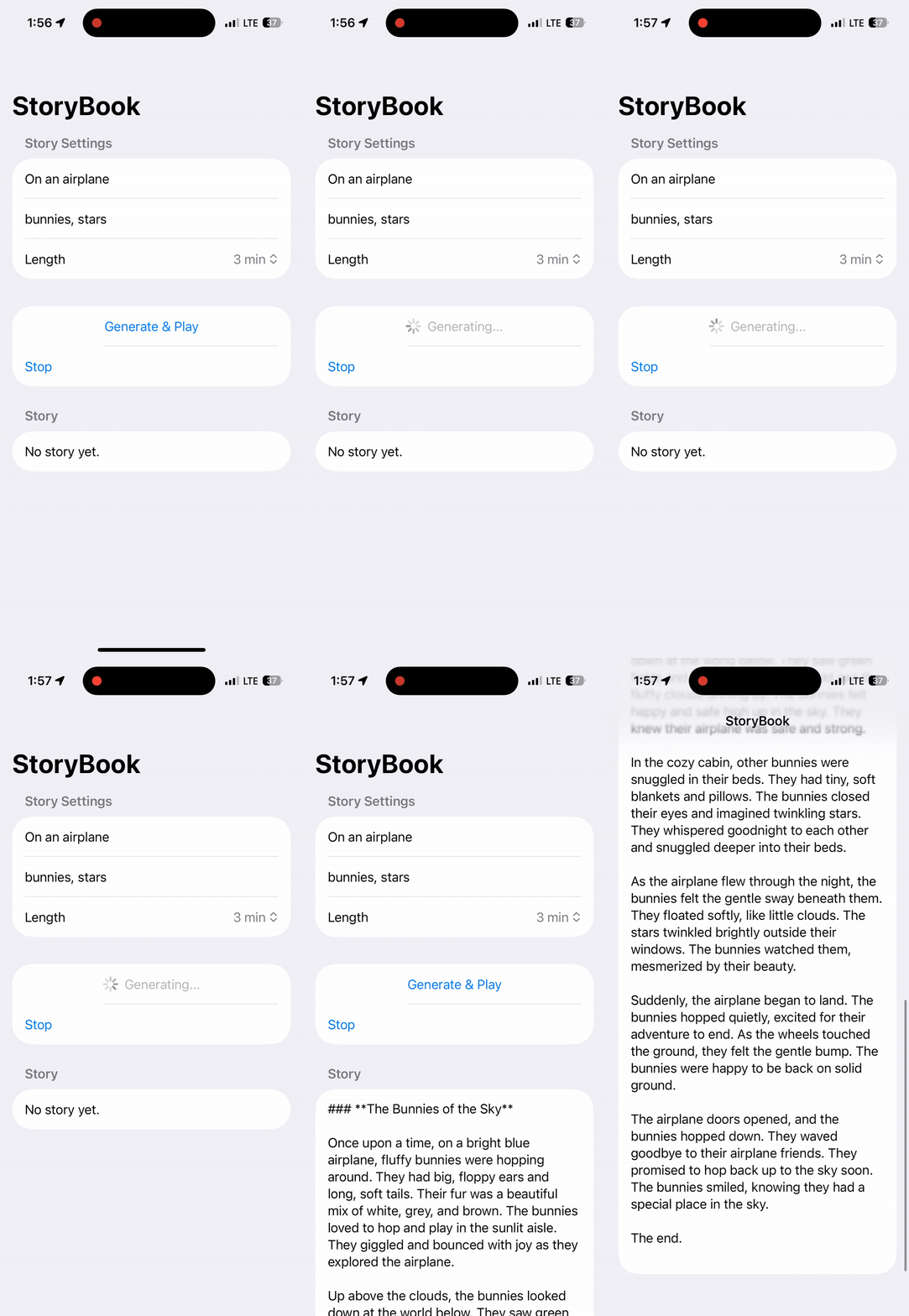
이번에 만들어볼 앱은 사용자가 설정한 입력값을 기반으로 감성적인 이야기를 자동 생성하고, 생성된 이야기를 음성으로 들려주는 스토리북 앱이고 네트워크 없이 온디바이스에서 동작해요
* 프로젝트를 시작하기 전에, Foundation Models을 사용하기 위한 몇가지 요구사항이 충족되어야 합니다!
@State 프로퍼티 정의
@State private var situation: String = "On an airplane"
@State private var likes: String = "bunnies, stars"
@State private var minutes: Int = 3

@State private var storyText: String = ""
@State private var isGenerating = false
@State private var errorText: String?
situation - 이야기의 상황
likes - 아이가 좋아하는 요소
minutes - 스토리 길이 (분)
storyText - 생성된 스토리 결과 텍스트
isGenerating - 생성 중 로딩 상태
errorText - 에러 메세지 표시용
body
var body: some View {
    NavigationStack {
        Form {
            Section("Story Settings") {
                TextField("Situation", text: $situation)
                TextField("Likes", text: $likes)

                Picker("Length", selection: $minutes) {
                    Text("1 min").tag(1)
                    Text("3 min").tag(3)
                    Text("5 min").tag(5)
                    Text("8 min").tag(8)
                    Text("12 min").tag(12)
                }
            }

            Section {
                Button {
                    Task { await generateAndSpeak() }
                } label: {
                    HStack {
                        Spacer()
                        if isGenerating { ProgressView() }
                        Text(isGenerating ? "Generating..." : "Generate & Play")
                        Spacer()
                    }
                }
                .disabled(isGenerating || !storyService.isAvailable)

                Button("Stop") {
                    speech.stop()
                }
            }

            if let errorText {
                Section("Error") { Text(errorText) }
            }

            Section("Story") {
                Text(storyText.isEmpty ? "No story yet." : storyText)
                    .textSelection(.enabled)
            }
        }
        .navigationTitle("StoryBook")
    }
}
body는 사용자가 이야기를 설정하고, AI가 생성한 스토리를 플레이 할 수 있는 전체 UI 흐름을 담당하고 있어요
코드는 크게 설정 입력, 버튼 액션, 결과/에러 표시의 구조로 나누어져있어요
generateAndSpeak()
@MainActor
private func generateAndSpeak() async {
    isGenerating = true
    errorText = nil
    storyText = ""

    do {
        let story = try await storyService.generateStory(
            situation: situation,
            minutes: minutes,
            likes: likes
        )
        storyText = story
        speech.speak(story)
    } catch {
        errorText = String(describing: error)
    }

    isGenerating = false
}
버튼을 탭하면 비동기 함수가 호출돼서 AI 스토리 생성 + TTS 재생이 차례로 실행되며
progressView()가 나타나며 현재 생성중인 상태를 표시해줘요
@MainActor를 사용해 UI 상태 업데이트를 메인 스레드에서 안전하게 업데이트해요
SpeechService
import AVFoundation
internal import Combine

@MainActor
final class SpeechService: NSObject, ObservableObject {
    private let synthesizer = AVSpeechSynthesizer()

    override init() {
        super.init()
        synthesizer.delegate = self
    }

    func speak(_ text: String) {
        stop()

        let utterance = AVSpeechUtterance(string: text)
        utterance.voice = AVSpeechSynthesisVoice(language: "en-US")
        utterance.rate = 0.45
        utterance.pitchMultiplier = 1.0
        utterance.preUtteranceDelay = 0.2
        utterance.postUtteranceDelay = 0.2

        synthesizer.speak(utterance)
    }

    func stop() {
        synthesizer.stopSpeaking(at: .immediate)
    }
}

extension SpeechService: AVSpeechSynthesizerDelegate {}
SpeechService는 AVSpeechSynthesizer를 이용해 텍스트를 음성으로 변환해줘요 (TTS)
아이를 위한 이야기이기 때문에 말하는 속도는 조금 느리게, 톤은 최대한 안정적으로 설정했어요
StoryService
import Foundation
import FoundationModels
internal import Combine

@MainActor
final class StoryService: ObservableObject {
    @Published var isAvailable: Bool = false
    @Published var statusMessage: String = ""

    private let session: LanguageModelSession

    init() {
        let model = SystemLanguageModel.default
        switch model.availability {
        case .available:
            isAvailable = true
            statusMessage = "모델 사용 가능"
        case .unavailable(let reason):
            isAvailable = false
            statusMessage = "모델 사용 불가: \(String(describing: reason))"
        }

        self.session = LanguageModelSession {
            """
            You write calming, safe bedtime-style stories for young children.
            Rules:
            - No scary, violent, or threatening content.
            - No medical or drug advice.
            - Use short, simple sentences.
            - Keep a warm, reassuring tone.
            - End with a gentle, calming closing.
            """
        }
    }

    func generateStory(
        situation: String,
        minutes: Int,
        likes: String
    ) async throws -> String {
        let target = targetWordCount(forMinutes: minutes)
        let prompt = """
        Situation: \(situation)
        Child likes: \(likes)
        Length: about \(target) words.

        Write the story in 4-6 short paragraphs.
        """

        let response = try await session.respond(to: prompt)
        return response.content
    }

    private func targetWordCount(forMinutes minutes: Int) -> String {
        switch minutes {
        case 1: return "120-180"
        case 3: return "350-500"
        case 5: return "650-900"
        case 8: return "1000-1300"
        case 12: return "1500-1900"
        default: return "350-500"
        }
    }
}
StoryService는 Foundation Models를 이용해 실제 스토리를 생성하는 핵심 로직을 담당해요
isAvailable을 통해 현재 디바이스에서 Foundation Models 사용 가능 여부를 판단하고
statusMessage를 통해 사용 가능/불가 상태를 UI에 전달하기 위한 메세지를 담아줍니다
시스템 프롬프트를 통해 Role을 명확히 지정해주고 사용자 입력 기반 프롬프트를 구성해줘요
결과는 요롷게 됩니다 ㅎㅎㅎ
전체 코드는 여기서 확인할 수 이써요!
https://github.com/kimhyeri/FoundationModelsPlayground/tree/main/CozyTales
FoundationModelsPlayground/CozyTales at main · kimhyeri/FoundationModelsPlayground
A collection of examples using Apple’s FoundationModels framework - kimhyeri/FoundationModelsPlayground
github.com
'Tech > On-Device' 카테고리의 다른 글
| Foundation Models로 Workout Plan Generator만들기 (1) | 2025.12.12 |
|---|---|
| Foundation Models로 Recipe Generator 만들기 (0) | 2025.08.08 |
| Apple Foundation Models - Tool calling (0) | 2025.08.07 |
| Apple FoundationModels - @Generable, @Guide (0) | 2025.08.05 |
| 애플 Foundation Models로 Grammar Correction 만들기 (0) | 2025.07.27 |
- Total
- Today
- Yesterday
- iOS SwiftUI
- swiftUI
- 애니메이션
- ReactiveX
- foundationmodels
- 딥러닝
- SWIFT
- 머신러닝
- objc
- RX
- 스위프트UI
- Xcode
- 온디바이스
- llm
- 알고리즘
- 책
- 책 후기
- objective-c
- leetcode
- ARC
- 책 추천
- Algorithm
- 스위프트
- wwdc
- string
- rxswift
- swift5
- Animation
- ios
- Deep learning
| 일 | 월 | 화 | 수 | 목 | 금 | 토 |
|---|---|---|---|---|---|---|
| 1 | 2 | 3 | 4 | |||
| 5 | 6 | 7 | 8 | 9 | 10 | 11 |
| 12 | 13 | 14 | 15 | 16 | 17 | 18 |
| 19 | 20 | 21 | 22 | 23 | 24 | 25 |
| 26 | 27 | 28 | 29 | 30 |